Coming June 2027. Not yet for sale.

Tell us what you need
PracticeCore

The work around the dentistry, in one system.

Card payments, claims, the books, supplies, payroll, vendors, staff schedules, and outside help when you are short. In most practices each one is a separate subscription, a spreadsheet, or somebody's evening. Here they are one system and one record, included in the one price.
Office manager dashboard
Today's production, collections, staffing and exceptions.Recorded from the live product on October 8, 2026

Nine jobs. One system.

In most practices each of these has its own tool, its own login and its own invoice, or it lives in a spreadsheet. The cost is the subscriptions, and then the hours someone spends carrying numbers from one to the next.
  • Card payments

    Take a card at the desk, keep one on file, or send a payment link through the portal. The payment lands on the patient's account without anyone keying it in again.

  • Claims

    Claims worked as a queue, with the stuck ones on top. Insurance payments fetched and posted by rule, with only the exceptions left for a person.

  • The books

    A general ledger fed by the practice as it works: deposits, bank reconciliation, budgets and financial statements. Nothing is re-keyed into a bookkeeping program at month end.

  • Supplies

    A catalog, stock on hand by location, expiry tracking, cycle counts, and purchase orders with approval and receiving. Reorder points are recalculated from what the practice actually uses.

  • Payroll

    Regular, off-cycle and bonus runs from the hours the time clock already has, reviewed before anything posts. Provider pay by production, collections, base plus a percentage, or hourly.

  • Vendors

    Vendors with their terms, bills due this week and bills overdue, approval before payment, expenses by category, and a running total for 1099-reportable vendors.

  • Staff scheduling

    Shifts by role and location, rules for how many of whom, and a coverage heatmap that shows the gap before the week starts.

  • The workforce

    Time clock and breaks from a phone, time off with balances, availability, shift swaps, and an app for every staff member.

  • Outside staff

    Short a hygienist on Thursday? Post the shift to the Network Marketplace, review the bids from outside workers, track the engagement, and record what the contractor is owed.

Money in.

From the claim to the bank account, without a second program in the middle.

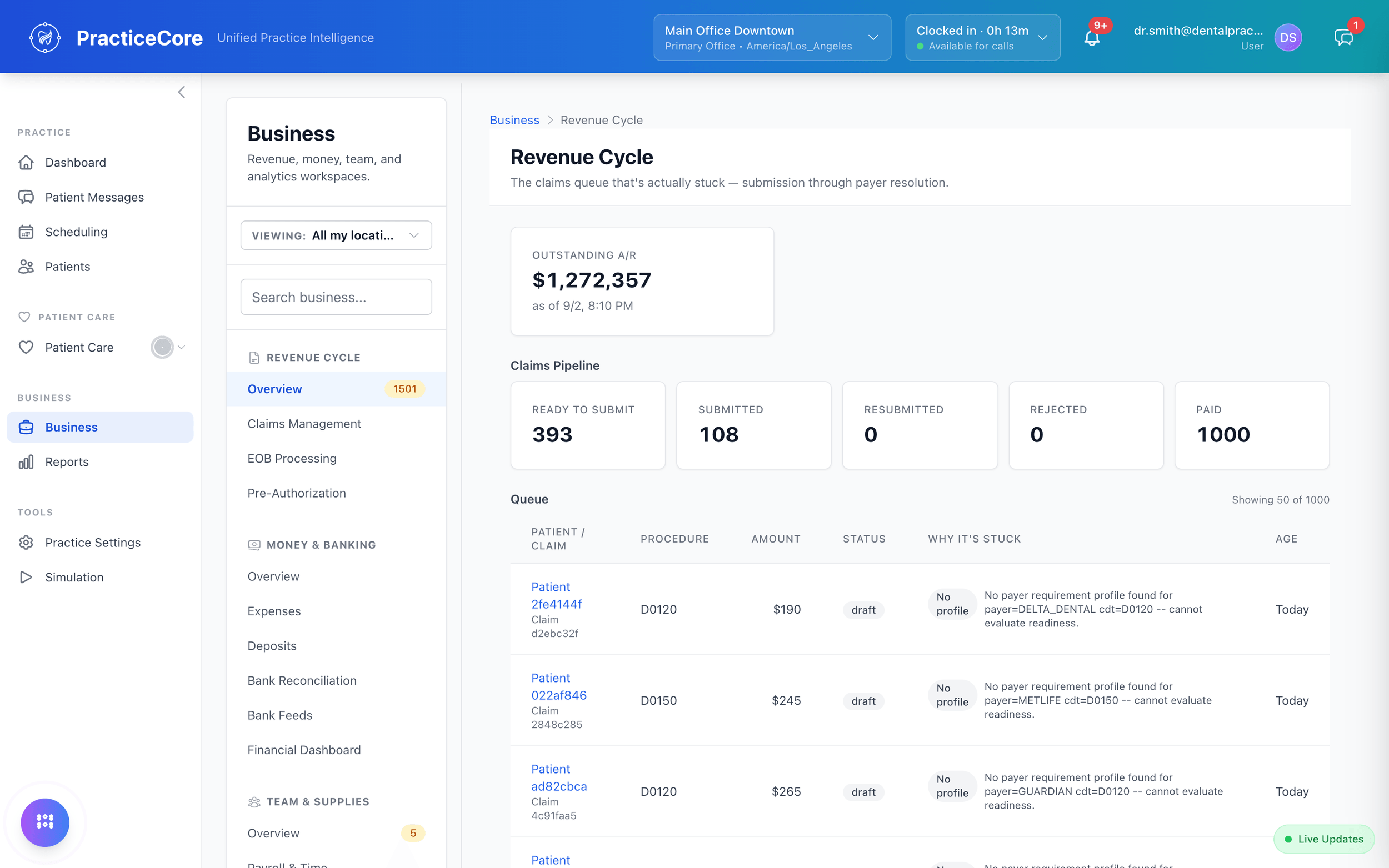
Claims, worked as a queue.

In flight, needs action, average days to payment, denial rate. Every claim from service to payment in one list, with the ones that are stuck at the top and the reason beside them.
Claims management: in-flight and needs-action counts, days to payment and denial rate, above the claims queue with insurer, amount, status and next action

Insurance payments that post themselves.
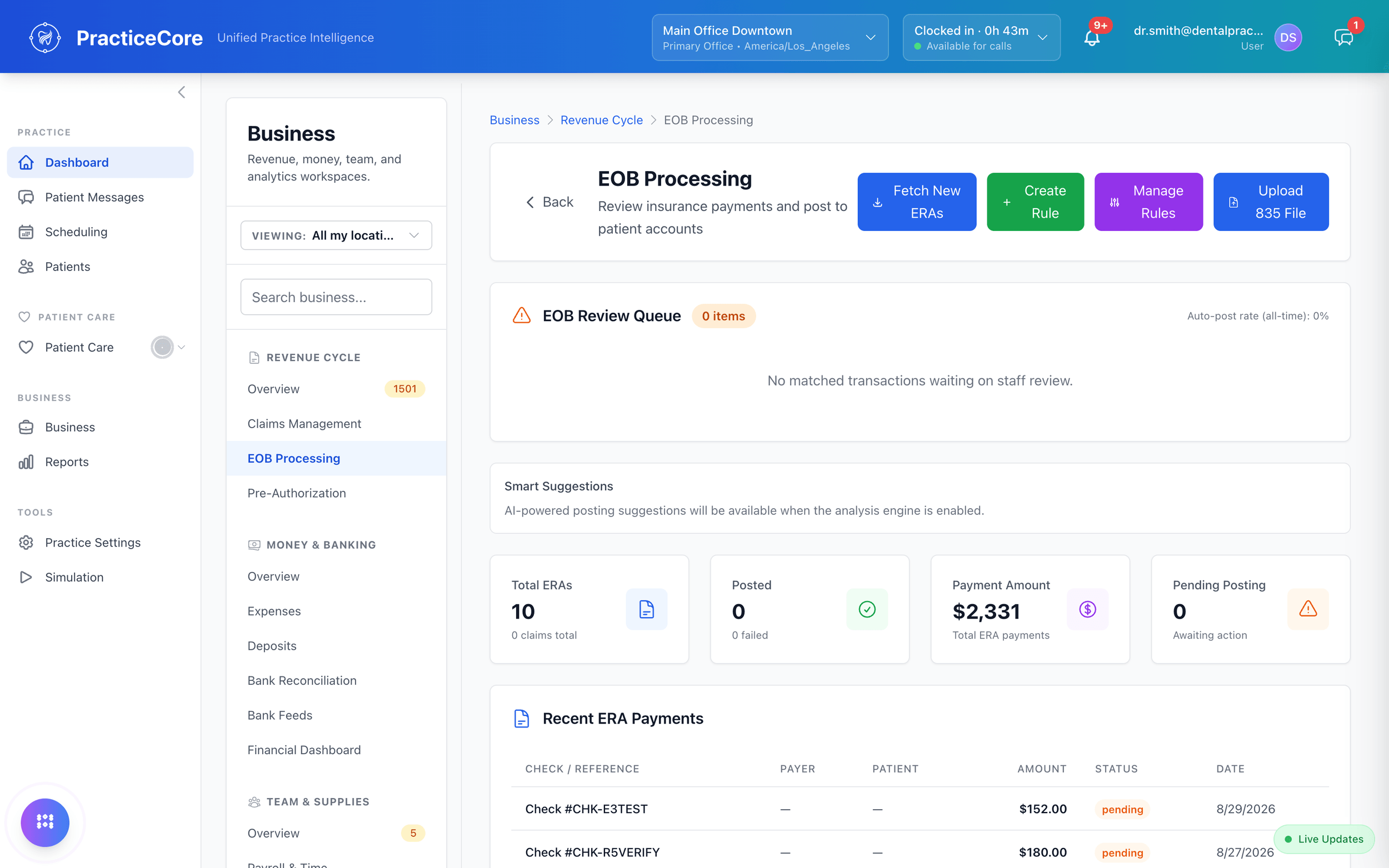
New remittances are fetched from the clearinghouse and posted by the rules the practice sets. What the rules could not settle waits in a review queue for a person. An 835 file can be uploaded when a payer sends one outside the clearinghouse.
EOB processing: fetch new ERAs, review queue, posting rules, and recent ERA payments

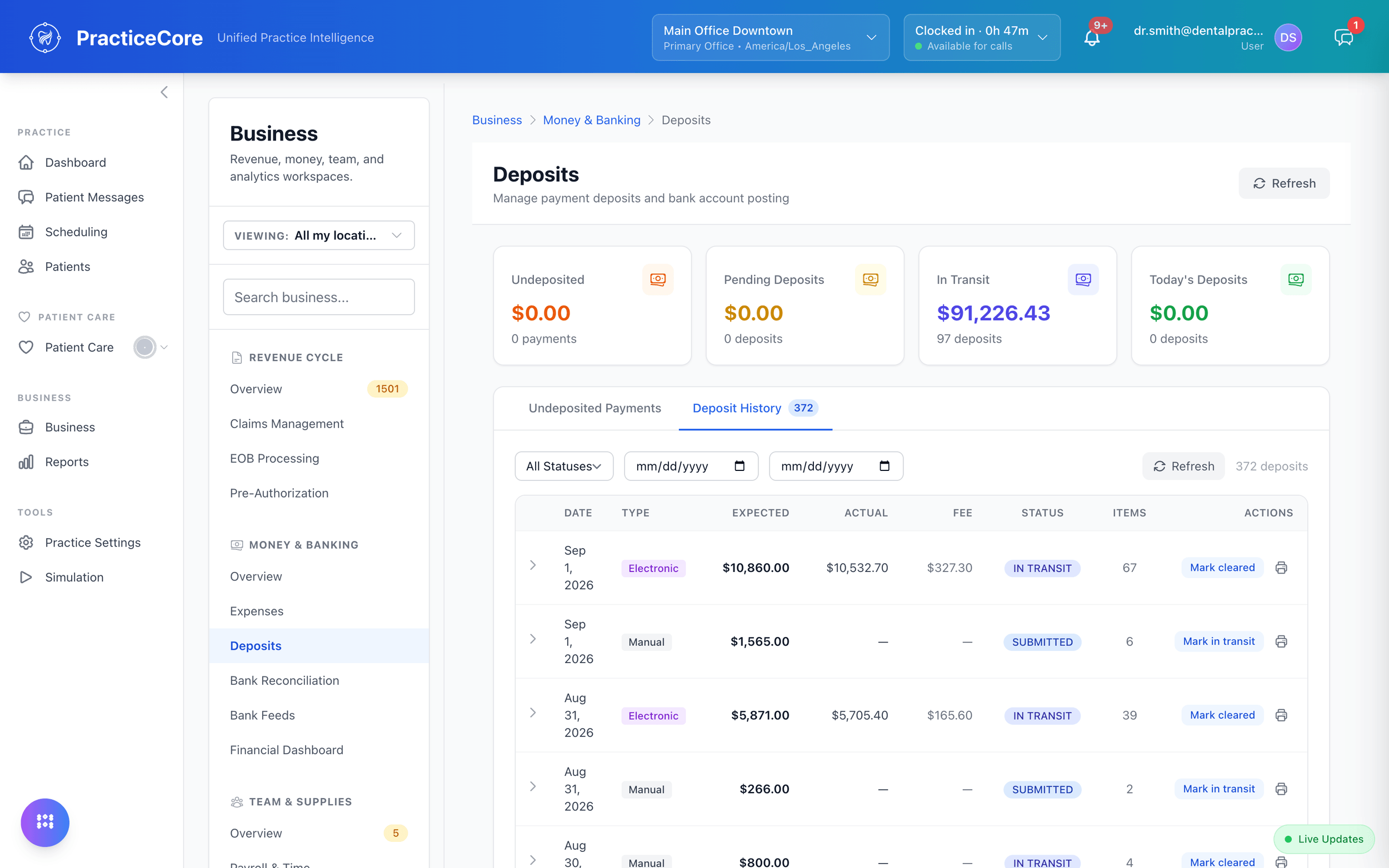
Deposits, then the bank.

Undeposited payments, pending and in-transit deposits, and a deposit history with expected against actual and the processing fee. Then the book balance against each bank account's feed, reconciled on a screen instead of a spreadsheet.
See billing and claims
Deposits: undeposited, pending and in-transit totals with the deposit history

Money out.

Payroll, provider pay, vendors and the budget they all draw on.

Payroll, from the hours you already have.

The time clock feeds the timesheet and the timesheet feeds the run. Regular, off-cycle and bonus runs, with net pay reviewed before anything posts and a history you can audit.
Payroll run
A payroll run in progress: hours and net pay, reviewed before posting.Recorded from the live product on October 8, 2026

Provider pay, the way you actually pay it.

Production, collections, base plus a percentage, hourly, bonuses. Compensation is configured per person, so the number on payday comes from the agreement and not from a spreadsheet somebody maintains.
Team compensation
Per-person compensation settings — production, hourly, bonuses.Recorded from the live product on October 8, 2026

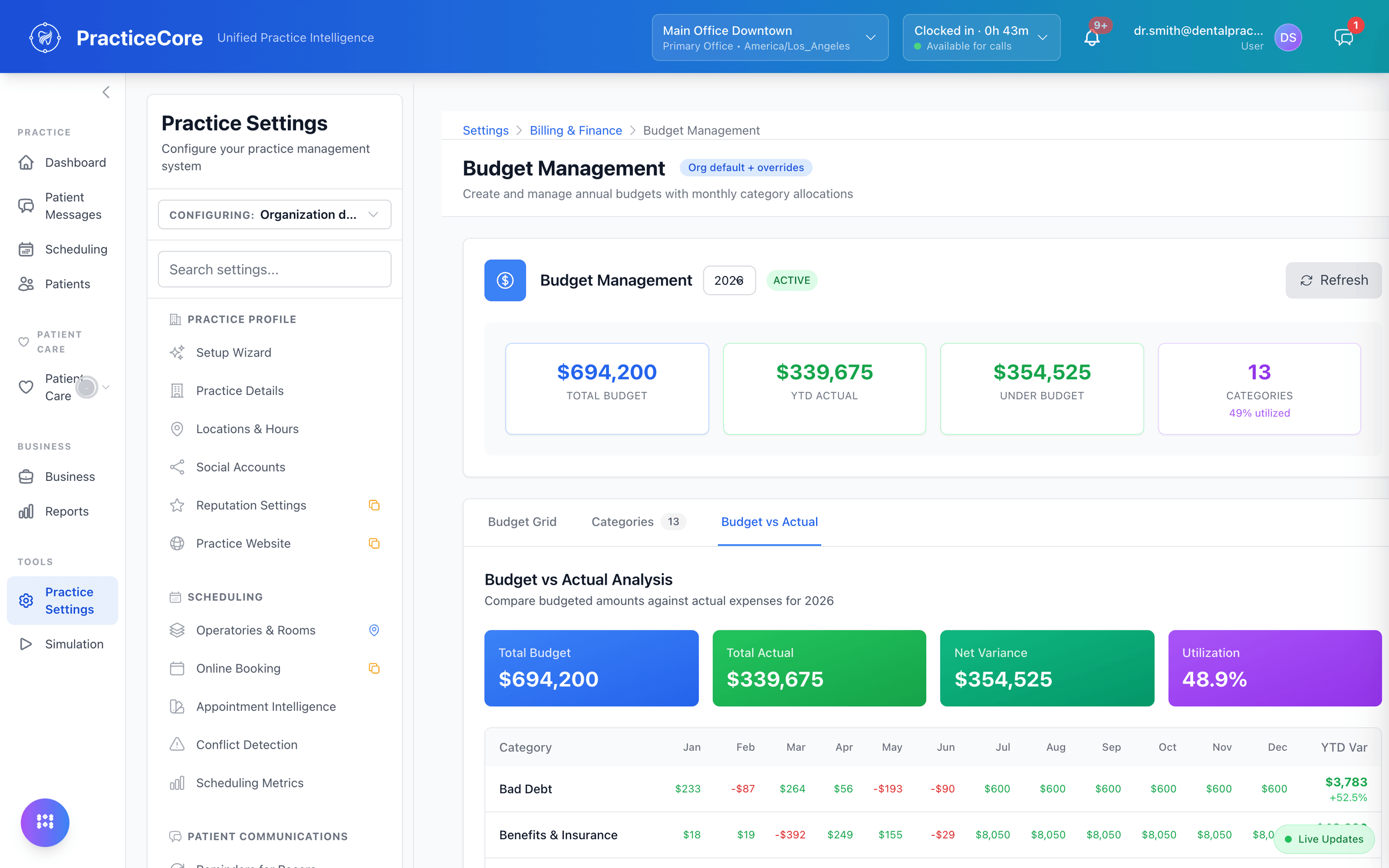
A budget, against actuals.

Annual budgets with monthly allocations by category, and the variance as the year runs. The categories that are over show in red.
Budget management: budget versus actual by category, month by month
  • Bills, due and overdue

    What is due this week, what is overdue and the total owed, with approval before a bill is paid.

  • Vendors with terms

    Every vendor in one list with payment terms and balance due, and a year-to-date total for the ones that are 1099-reportable.

  • Expenses by category

    Entered once, counted against the budget, and posted to the ledger.

The books.

A general ledger that is fed by the practice as it works, not assembled at month end.

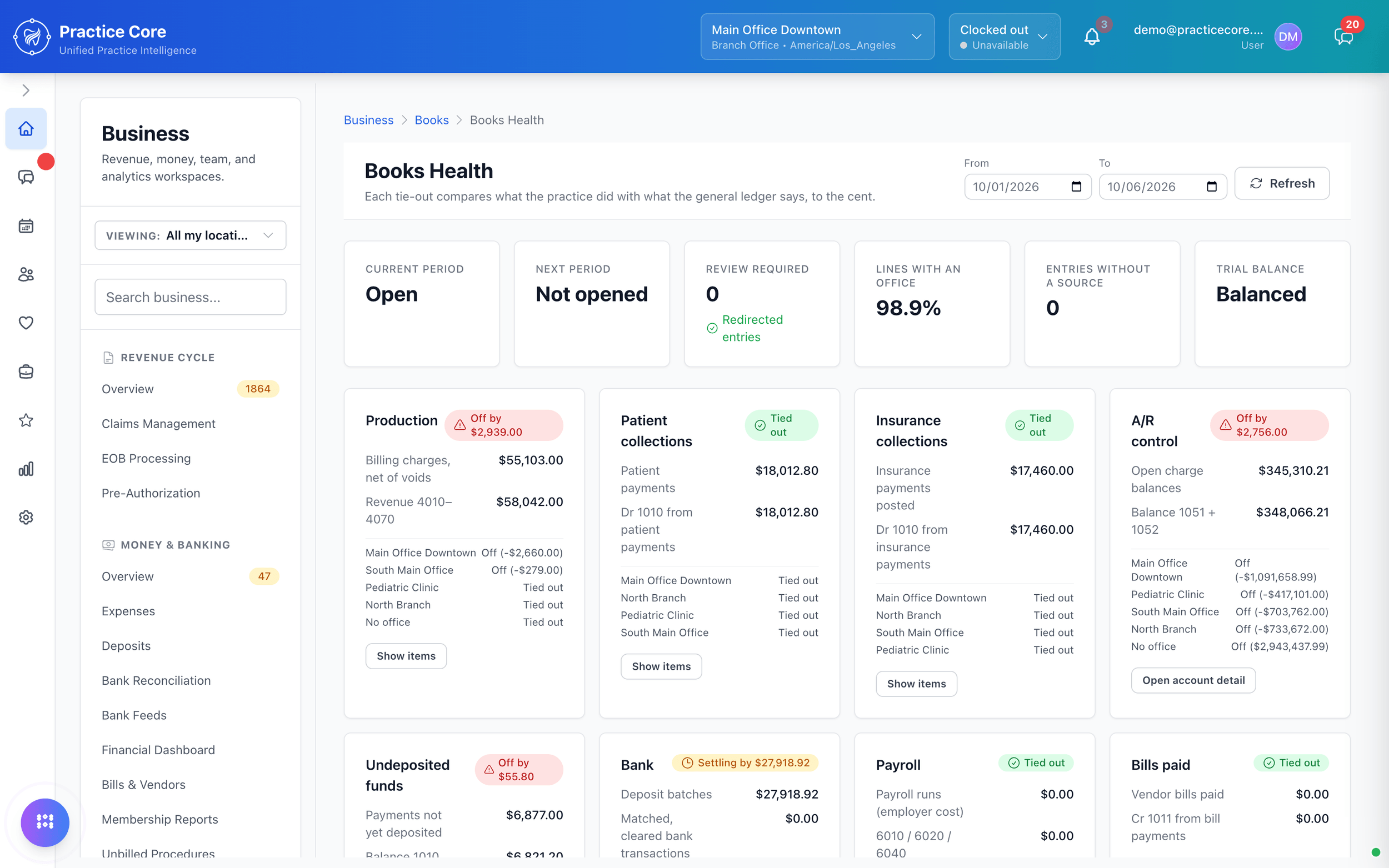
Books that tie out, to the cent.

Production, patient and insurance collections, receivables, undeposited funds, the bank, payroll and bills paid, each compared with what the general ledger says. Where they differ, the difference is shown by office, with the items behind it one click away.
Books Health: a tie-out for production, collections, receivables, undeposited funds, the bank, payroll and bills, each marked tied out or off by an amount, by office

Every line, with where it came from.

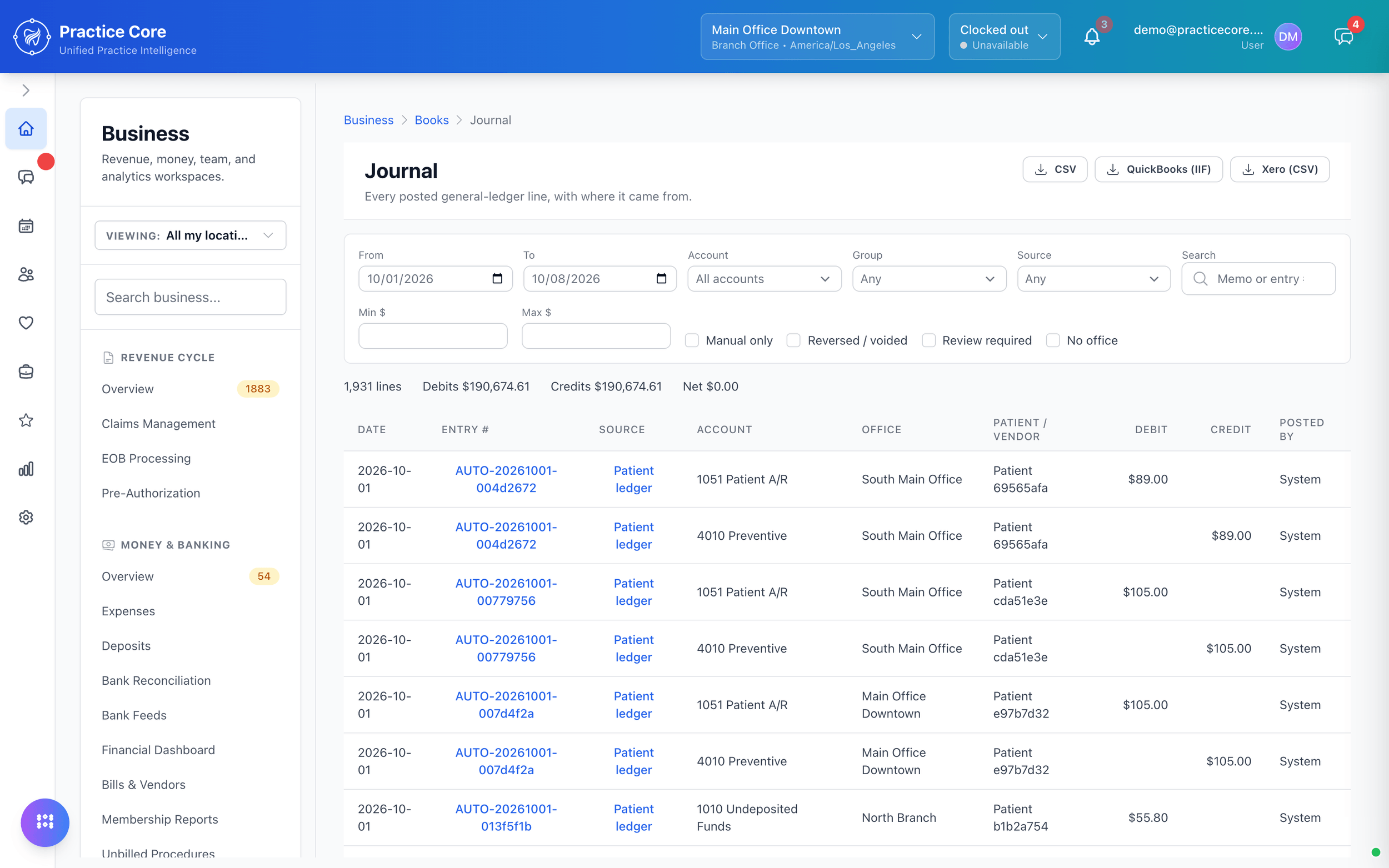
The journal lists each posted line with its source, account and office, and the debits equal the credits. Charges and payments post as they happen. If your accountant works in QuickBooks or Xero, the journal exports to both.
The journal: every posted general-ledger line with its source, account and office, debits equal to credits, and exports to CSV, QuickBooks and Xero

A general ledger, in the PMS.

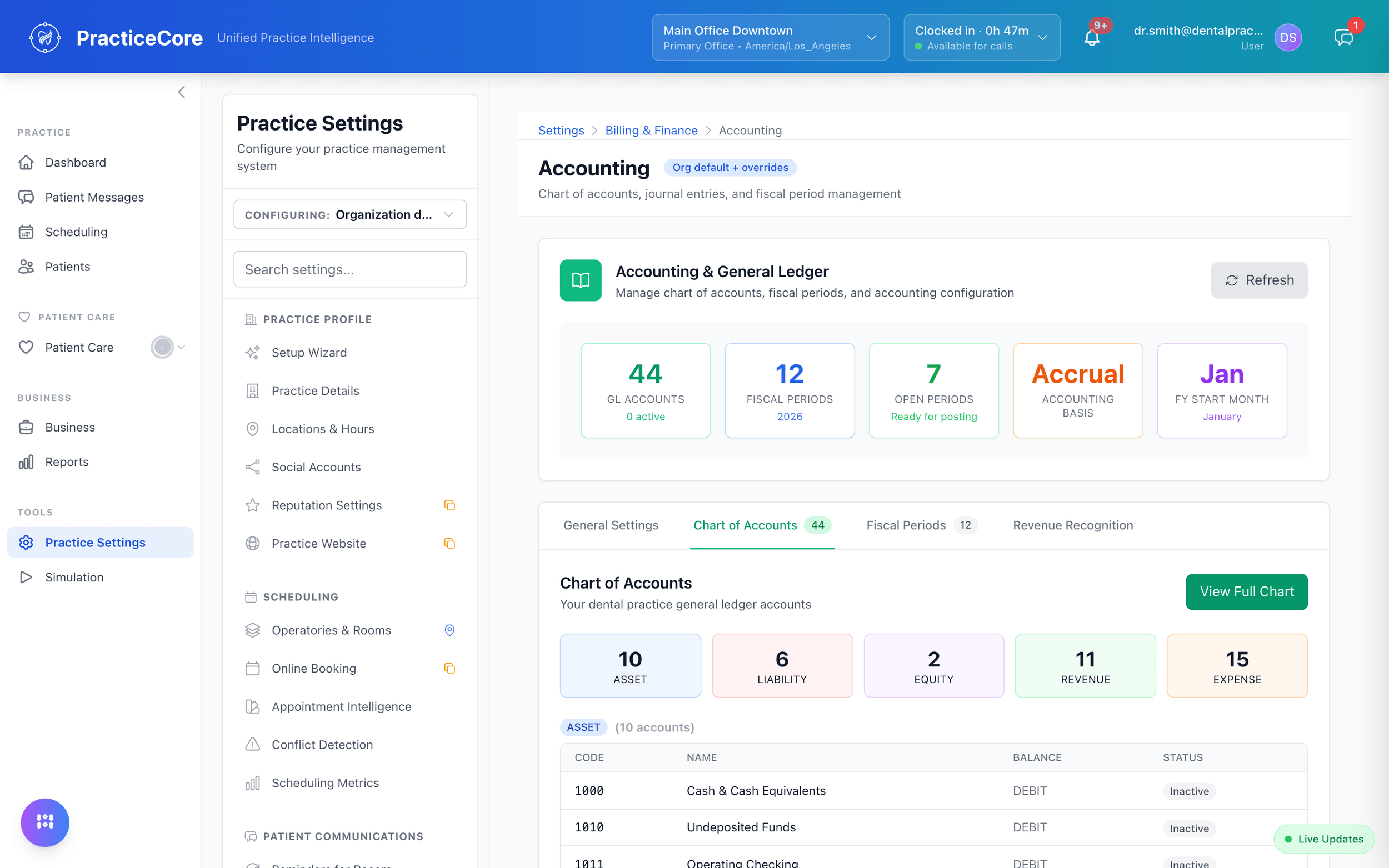
A chart of accounts, fiscal periods, accrual or cash basis, a trial balance and financial statements, kept by the same system that takes the payment.
See the platform
Accounting: the general ledger with its chart of accounts, fiscal periods, and revenue recognition

People.

Who is working, when, what they are owed, and who covers the shift nobody can.

The week's staffing, before it starts.

Shifts by role and location on a week grid, built against rules for the minimum and ideal staff by role, day and time block.
Staff schedule
Staff shifts by role and location on a week grid.Recorded from the live product on October 8, 2026

The gap, in red.

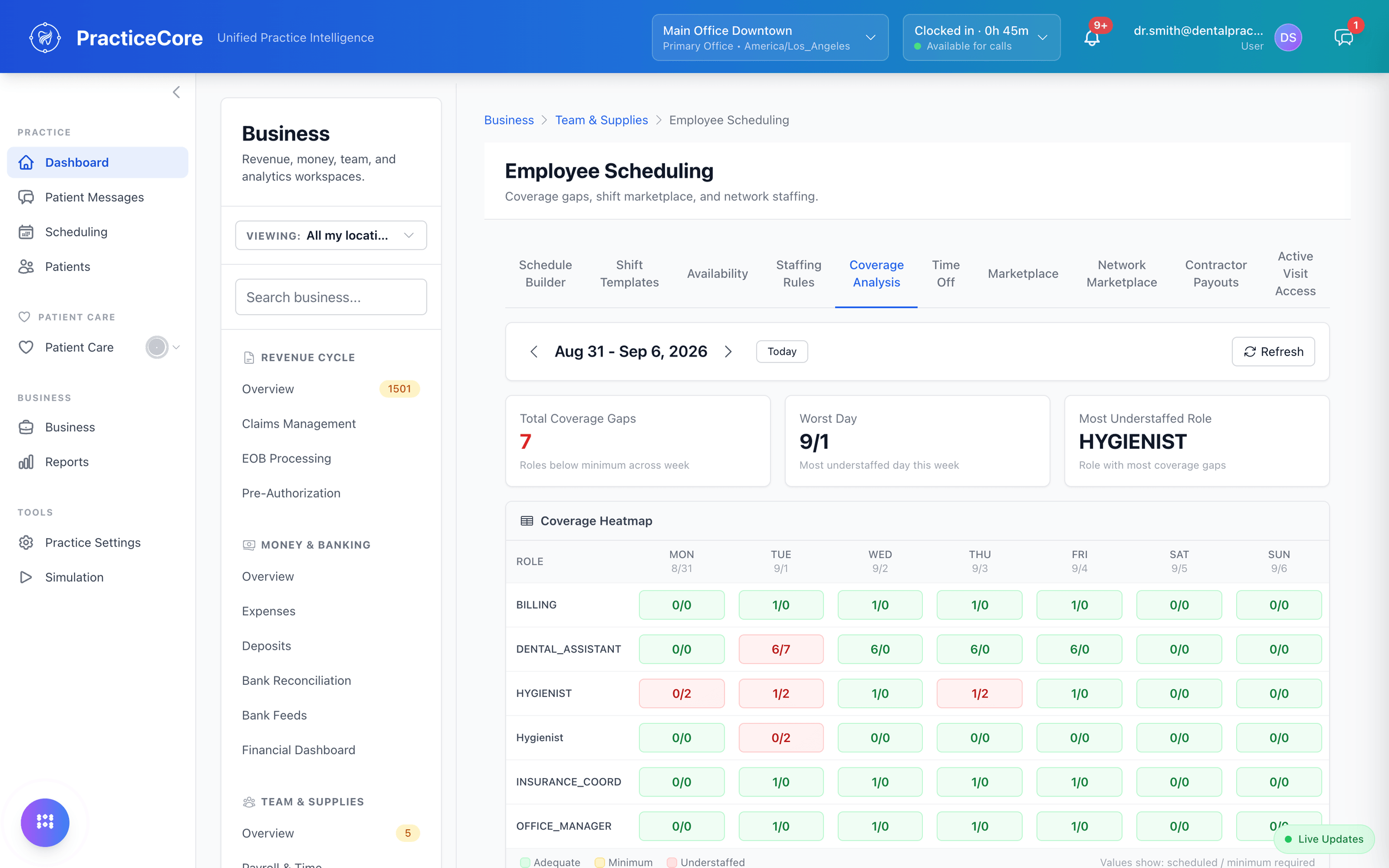
Scheduled against required, by role and day, with the understaffed cells in red and the worst day named. A Tuesday with one hygienist shows up on Friday, not on Tuesday.
Coverage analysis: a heatmap of scheduled versus required staff by role and day, with the gaps in red

Clock in, take the break, get paid right.

Time and breaks tracked from a phone, flowing straight into the hours payroll runs on. No separate time-tracking subscription to reconcile.
See team tools
Time clock widget
The header time-clock widget, open, showing the week's hours.Recorded from the live product on October 8, 2026
  • The Network Marketplace

    Post an open shift to a network of outside workers and review their bids. Accepted shifts appear as engagements you can start, complete, or mark as a no-show.

  • Contractor payouts

    What the practice owes each outside worker for completed shifts, and the payment history against it.

  • The team's own marketplace

    Staff post a swap, a drop or an open shift, and a colleague picks it up. No group text, no spreadsheet.

Supplies.

What is on the shelf, what is about to expire, and what needs ordering, in the same system as the schedule and the books.
  • Catalog and kits

    Every item with its unit and cost. Kits bundle the supplies a procedure or an appointment type uses.

  • Stock and expiry

    On hand by location, bin and lot, with the lots at risk of expiring unused listed before they do.

  • Cycle counts

    Expected against counted, the variance per item, and the shrinkage in dollars.

  • Purchase orders

    Raised, approved, confirmed and received in one place, with a queue for the approver.

  • Reorder points that adjust

    Par levels and reorder points per item and location, with suggested values recalculated daily from what was actually used.

  • Supply cost, measured

    Supplies as a share of collections against a benchmark band, supply cost per procedure, and losses to waste and expiry.

Ask the way your team would. This is the same help that is built into the product, answered with the real screens, not a help-center article.

Or pick one of the recorded answers.

Why it is one system.

A payment taken at the desk is a deposit, then a line on the bank reconciliation, then revenue in the ledger. An hour on the time clock is a line on a payroll run, then an expense against the budget. When those live in separate tools, somebody carries the number across by hand. Here it is carried once, by the system.

  • No module fees

    Payroll, inventory, the ledger and the marketplace are included in the one price.

  • No per-seat fees

    Every staff member gets the app. The invoice does not change.

Run your number on the pricing page

Bring your month-end.

Twenty minutes. We will show you the claim, the deposit, the payroll run, and the books they land in.